
On this page
Artifacts use a dedicated equipment interface. They are separate from your ordinary armor slots and should be evaluated as a complete set of compatible components.
Inspect the interface
Open the Artifact button from inventory. Check which slot arrangement is active and the types it accepts. Matching an artifact to a slot involves its type; an empty space does not mean any artifact fits there.
Equip methodically
- Read the artifact family and type on the item.
- Match it to a compatible slot in the Artifact interface.
- Inspect its individual option before equipping.
- Check which types are still missing from the arrangement.
- Verify whether the displayed full-set condition is met.
For the standard Spider system, duplicates of the same numbered type do not fill different type requirements. A full-set bonus depends on completing the required arrangement, not simply collecting many artifacts in your bag.
Fragments and crafting
Fragments are ingredients rather than automatically equipped bonuses. Inspect the crafting result, materials and chance at the relevant combination menu. Save useful duplicates separately from materials you intend to consume.
Upgrade priorities
First identify missing types. Then compare the actual options of possible replacements. An elemental effect and an ordinary damage effect solve different problems; select according to the build you are improving.
Use the boss directory to search configured reward pools for relevant fragments. A generic crafting guide does not guarantee that every fragment drops from every boss.
Illustrated walkthrough
Find the dedicated equipment window
The Artifact button in inventory opens the placement board. This is where you equip pieces; leaving fragments or completed artifacts in the ordinary bag does not fill the board.
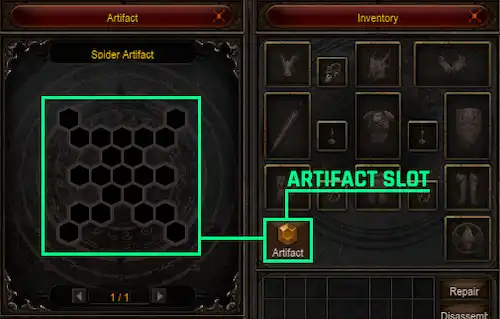
The highlighted button opens the board. Match the artifact family and numbered type before placing a piece.
Understand the three different items
| Item | Job |
|---|---|
| Artifact Fragment | Ingredient used to create an artifact. |
| Completed Artifact | Equipment placed in the compatible board. |
| Artifact Enhancement Stone | Material used to enhance an existing artifact. |
Creation can produce a random numbered type, so crafting another piece does not guarantee it fills your remaining gap. Enhancement improves an existing piece; it does not turn a duplicate into the missing type.
Fill the board before optimizing every roll
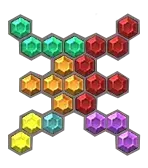
A completed arrangement shows how the different shapes fit together; loose duplicates do not complete missing types.
List the missing type numbers, then compare candidates of those types. Once the required arrangement is complete, inspect the full-set effect in the interface. Replacing one piece should preserve the completed arrangement if you want to retain that condition.
Crafting and enhancement are separate decisions
The Chaos Goblin's combination menu handles the standard artifact workflow. For creation, inspect the fragment recipe and its random result. For enhancement, inspect the existing artifact and enhancement material. Read the current failure message for the selected action rather than applying the creation rules to enhancement.
If you consider disassembling a duplicate, first compare its options against the piece you wear. Disassembly consumes equipment; it is not a way to temporarily unequip it.