On this page
MU includes several companion and mount systems. A Muun, a Guardian and a class-specific pet are not interchangeable items and do not necessarily share upgrade or repair rules.
Identify the system
| Item type | First thing to inspect |
|---|---|
| Muun | Its equipment interface, base effect and conditional bonus. |
| Guardian | Requirements, listed options, condition and upgrade route. |
| Class companion | Required class, relevant attributes and associated skills. |
Check when a bonus applies
Read the full tooltip for map, time, duration or other activation conditions. A bonus printed on the item may be conditional. Compare your values under the same conditions when testing two companions.
Prepare before a long hunt
Equip the intended item in the correct interface and inspect its condition. Check the client for any upkeep or recovery operation it requires. Store spare evolution or enhancement materials where you can identify them easily.
Before evolving or upgrading
Confirm the exact item and material. Read whether existing options can change and what a failed attempt consumes. Do not assume a Guardian upgrade behaves like an ordinary weapon upgrade or that a Muun evolution uses the same materials as another Muun.
Choose practical value
A companion that supports the map and attack you currently use is easier to evaluate than one bought for an advertised maximum under unrelated conditions. Compare the complete equipped build and avoid counting an inactive conditional bonus as permanent power.
Continue with stats and upgrade planning.
Illustrated walkthrough
Choose the correct Trainer operation
Guardian actions are different operations, not one interchangeable upgrade button. In the standard system, the Trainer in Lorencia handles creation, enhancement, generation upgrades and elite-option changes.
| Operation | What you are trying to change | What to inspect before confirming |
|---|---|---|
| Guardian Resurrection | Create the first Phantasmal Steed. | The seal, resurrection materials and result preview. |
| Guardian Enhancement | Raise the current Guardian's +level. | The required upgrade stone and failure consequence. |
| Upgrade Guardian | Move from one Guardian generation to the next. | The accepted previous Guardian, target generation and retained options. |
| Change Guardian Option | Reroll elite-resistance options. | The conversion material and which options can change. |
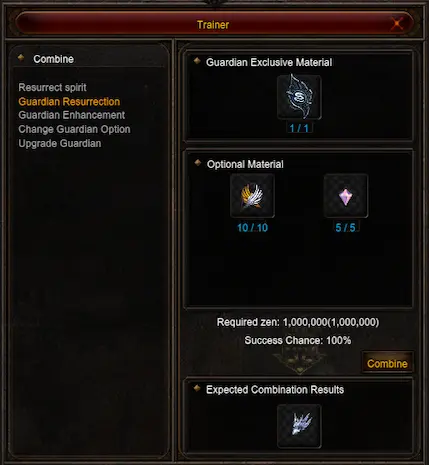
Interface example. The displayed costs, chances and requirements are illustrative; check the current Velocity window before combining.
Create, then inspect the result
Select Guardian Resurrection for the first mount. Match the requested materials, inspect the expected item and confirm the combination only after reading the current cost. Afterward, check the new item's requirements and options before equipping it.
Enhance the mount you already own
Select Guardian Enhancement, insert the intended Guardian and inspect the requested stone. Guardian Upgrade Stone and Elite Guardian Upgrade Stone are distinct materials; choose the one requested for the attempted level.
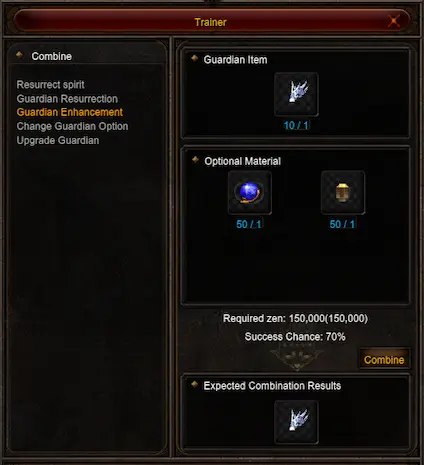
Interface example. The displayed costs, chances and requirements are illustrative; check the current Velocity window before combining.
A higher enhancement and a later generation are different goals. If you want a different mount, increasing the existing mount's +level alone does not perform the generation conversion. Read the separate Upgrade Guardian recipe.
Change an elite option deliberately
Use Change Guardian Option when the goal is an elite-resistance change. Do not expect this action to be a general reroll of every displayed property.
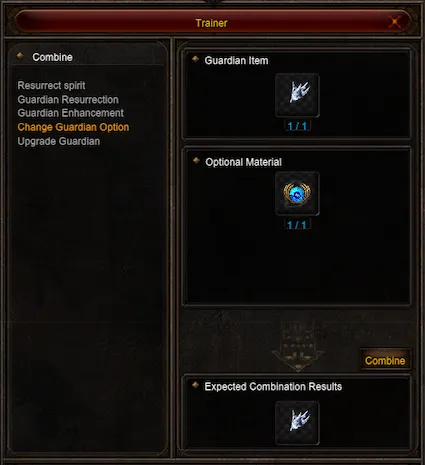
Select the operation that matches your goal before adding the item.
If the Guardian stops helping
Check that it is equipped and still has health. Standard Guardians lose health with use; at zero health their benefits cease. Jewel of Bless is used for Guardian health recovery in the standard system. Verify that you are interacting with the Guardian, rather than another item, before applying anything.
For Muuns, inspect the separate Muun inventory and activation conditions. For a Dark Lord companion, inspect its own skills and requirements. The Trainer screenshots above explain Guardian operations only.